Page 48 FTDX1200 Operating Manual

INTERFERENCE REJECTION Cont'd

Previous Page    Index of Topics    Table of Contents    Index of Pages    Next Page

µTUNE FILTER (REQUIRES THE OPTIONAL RF µTUNNING KIT) Cont'd

ADVICE Ccont'd

As you tune around on an amateur band with µTune engaged, the microprocessor automatically commands the stepper motor driving the toroid core to center the filter on the current operationg frequency. However, you may use the [VFO-B/CLAR] knob to skew the filter response to one side or the other of the operating frequency, to deal with heavy interference on one side. To re-center the µTune filter on the operating frequency, and eliminate any offset, press the [CLEAR] button.

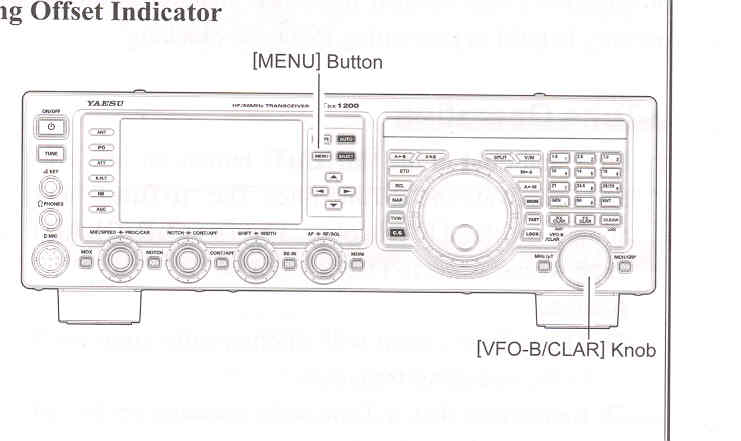
Changing the Tuning Offset Indicator

  1. Press the [MENU] buttom to engage the Menu mode.
  2. Rotate the [VFO-B/CLAR] knob (or press the ▲ / φ button) to select Menu item "011 BAR DISPLAY SELECT".
  3. Press the [SELECT] button.
  4. Rotate the [VFO-B/CLAR] knob (or press the ▲ / φ button) to select "µTUNE (µTune)" (replacing the default "CW TUNE (CW TUNING" selection).
  5. Press the [SELECT] button, then press the [MENU] button to lock in the new setting and exit to normal operation.
End of "µTune Filter (Requires the Optional RF µTuning Kit)"

Cont'd Next Page "Interference Rejection"

Previous Page    Index of Topics    Table of Contents    Back to Top    Index of Pages    Next Page

Page 48 FTDX1200 Operating Manual